Attendance tracking records an employee’s status for a workday or shift, such as present, absent, or half day, using the organization’s rules. Time tracking records how long work takes; project time tracking also shows which tasks or clients received those hours. A business may use the same time entries for both, but each report answers a different question.
The distinction becomes useful when HR sees a full day of attendance while a project manager sees only five client hours. The records may agree perfectly: meetings, training, and internal work can explain the difference. The problem starts when managers treat attendance, project effort, and billable time as interchangeable.
This guide compares attendance tracking vs time tracking, walks through one workday, and gives you a checklist for choosing software and resolving mismatched totals.
Attendance tracking vs time tracking: a practical comparison
Compare the two across the same six questions before deciding what your team needs:
- Main question: Attendance asks, “Did this person meet the applicable attendance requirements?” Time tracking asks, “How much time was recorded, and where was it spent?”
- Unit of record: Attendance is usually organized by employee and day or shift. Time tracking is organized by time entry and can be grouped by employee, project, task, or client.
- Useful fields: Attendance records may include check-in, check-out, hours, status, and approved exceptions. Project time records need duration plus a clear project or task, with enough context to explain the work.
- Rules applied: Attendance uses the organization's schedule and attendance policy. Project reporting uses work categories; billing review additionally uses the client agreement.
- Management decision: Attendance supports attendance reviews and HR administration. Time tracking supports estimates, workload planning, project-cost analysis, and the preparation of billing records.
- Limit: Attendance status does not explain project effort. Recorded duration does not establish completion or quality. Neither figure alone tells you how productive someone was.
The labels on software products can overlap. A time and attendance tracking system may provide both views. Check its inputs, approval process, and reports rather than assuming the name tells you what it does.
What belongs in employee attendance records?
A useful attendance record lets a reviewer understand the status assigned to a workday or shift. Depending on the process, its inputs may be clock events, a reviewed timesheet, or tracked hours evaluated against a configured policy.
For example, an organization might define the hours needed for full-day or half-day attendance. Another may need to review a scheduled start time or an approved exception. Document the rule before asking software to apply it.
- Identify the employee, reporting date, and applicable shift or schedule.
- Show recorded hours and the attendance status they support.
- Keep corrections and approvals understandable to the reviewer.
- Check missing entries with the employee before drawing a conclusion.
Prime Teams' attendance tracking software applies configured rules to tracked hours and approved manual entries. Its attendance reports include check-in, check-out, logged hours, manual entries, and total hours, with monthly filters and Excel export.
An attendance export can support payroll review. It does not, by itself, resolve which hours are payable, how breaks are treated, or which local requirements apply. Have the responsible HR or payroll specialist review those decisions.
What does project time tracking add?
Project time tracking connects a duration to the work that used it. Instead of “eight hours worked,” a report can show three hours designing a client website, two hours reviewing another campaign, and three hours of internal work.
That detail helps a project lead investigate a missed estimate, see how support requests affect delivery, or identify recurring revision work that needs a different scope next time. For fixed-fee projects, it remains useful even when no hourly invoice is produced.
Prime Teams' time tracking software lets team members select a project and task before starting the timer. Project-wise and member-wise reports then show effort from both the project's and the employee's perspective.
Choose categories employees can use consistently. “Internal operations” is useful when it contains recognizable tasks such as meetings, training, and administration. A single “General” task for every activity leaves little to analyze. The guide to tracking time by project and task explains how to structure assignments and switch between them without creating excessive detail.
Worked example: one day, several valid totals
Consider an illustrative agency workday from 9:00 a.m. to 5:30 p.m., with a 30-minute lunch break excluded from recorded work. The elapsed span is 8.5 hours, while the work entries total eight hours:
- Client A website design: 3 hours
- Client B campaign review: 2 hours
- Internal planning meetings: 2 hours
- Reusable team templates: 1 hour
Attendance: If the organization's rule recognizes these eight work hours as a full day, the employee receives that status. The example does not prescribe a universal full-day threshold or break policy.
Project allocation: Five hours belong to client projects and three to internal work. Both categories contribute to the eight-hour work total.
Billable time: The five client hours still need a commercial review. Some work may fall outside an approved scope or be included in a fixed fee. Client-allocated hours are not automatically billable hours.
Now suppose the template work was missed and the time report shows seven hours. First check with the employee, record the missing hour through the correction process, and obtain the required approval. Adding an unexplained hour to a client project would make the totals agree while making the project report wrong.
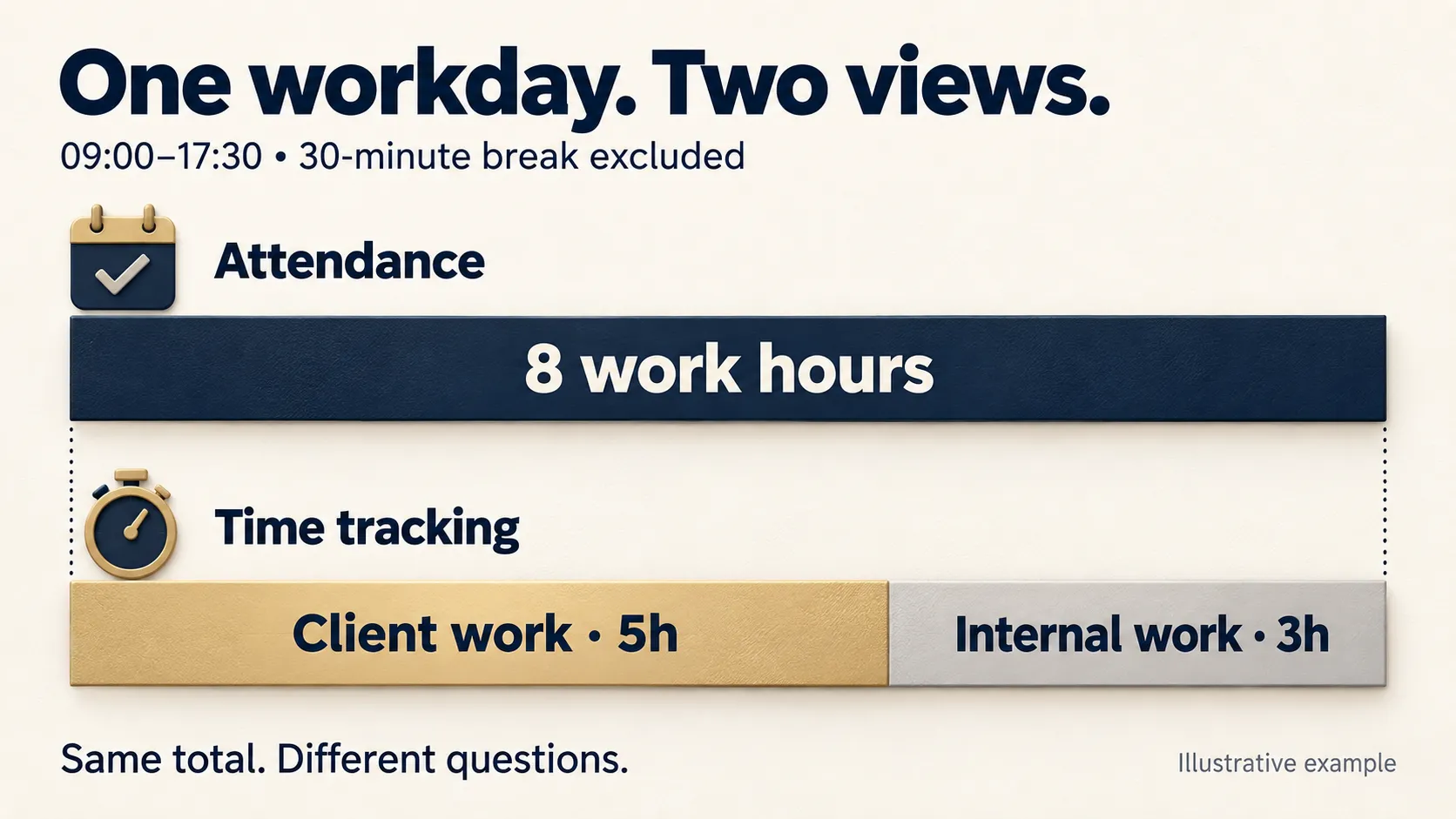
Illustrative example: the same eight recorded work hours can support attendance records and a project-time breakdown. Attendance status depends on company policy.
Keep four labels distinct when reviewing the day: elapsed span, recorded work, project allocation, and billable time. Attendance status is the result of applying the relevant policy to the appropriate records.
Which tracking approach should your team choose?
Choose attendance tracking for attendance administration
If your main questions concern attendance status, missing entries, and exceptions, start with reliable employee attendance records. HR needs clear rules, a practical correction process, and reports it can review. Detailed client allocation adds little if nobody uses it to make a decision.
Choose project time tracking for effort and scope
If your main questions are “Why did this project exceed its estimate?” or “Where did the team's capacity go?”, prioritize project and task attribution. Agencies and service teams need categories that distinguish delivery work, revisions, meetings, and internal activity. Review hours alongside the agreed output.
Use both when HR and project leads need different views
A remote or hybrid agency may need attendance information for HR and project hours for account managers. Connected records can reduce re-entry, provided both reports use compatible dates and clearly defined rules.
If employees currently maintain the same work in several tools, the article on bringing project management and time tracking into one workflow provides a broader look at that setup. Test how corrections move through your own process before replacing a working system.
A reconciliation checklist for time and attendance tracking
When two reports disagree, identify what each total includes before editing either one. Work through these checks in order:
- Match the reporting scope. Compare the same employee, date range, time zone, and shift boundary. An overnight entry can fall on different dates in different reports.
- Compare like-for-like hours. Establish whether a figure represents clocked span, recorded work, approved work, client allocation, or billable time. Name the difference before calling it an error.
- Check approval status. Find manual entries or corrections awaiting review. Record the reviewer and next step rather than treating a pending entry as final.
- Look for missing work and overlaps. Review meetings, work away from the computer, forgotten timers, and entries that overlap. Ask the employee what happened before changing the record.
- Check the project assignment. A correct duration under the wrong project can leave attendance unchanged while distorting a project report. Correct the attribution rather than creating a duplicate entry.
- Apply the relevant policy. Confirm how breaks, approved exceptions, and attendance thresholds affect this particular day. Handle payroll and billing classifications in their respective reviews.
- Re-run and explain. After an authorized correction, check both reports again. Keep a short explanation of the change and assign any unresolved issue to a named reviewer.
Use the workday example as a simple check: five client hours plus three internal hours should explain eight recorded work hours. Those eight hours need not equal the 8.5-hour clock span or the amount approved for a client invoice.
Common mistakes that make the reports less useful
Counting every gap as an absence
A timer gap may come from a forgotten entry, a phone call, or work away from a keyboard. Ask what happened and use the correction process. Equally, do not fill gaps automatically just to reach an expected total.
Using project hours as a completion percentage
Recording eight hours against an eight-hour estimate does not mean the task passed review. It may still need testing or a client decision. The workflow for reviewing team time alongside project progress shows how to connect recorded effort with accepted deliverables, blockers, and remaining work.
Letting internal work disappear
If the only available categories are client projects, employees have nowhere accurate to put training, administration, or internal meetings. Provide a small set of internal categories and explain them. Otherwise, utilization and client-effort reports can become misleading.
Changing the rules without preserving context
A new attendance threshold or reporting filter can change how the same entries are interpreted. Document when a policy takes effect, explain it to employees, and check the period being reviewed. Avoid comparing reports generated under different rules as though they were identical.
How to evaluate time and attendance software
Use a short test based on real work patterns rather than judging a dashboard alone. Ask the vendor to demonstrate these scenarios:
- A normal day split between two client projects and internal work
- A missed hour entered manually and reviewed by the right person
- A correct duration moved from the wrong project to the right one
- A reporting period containing an overnight shift or different time zones, if relevant to your team
- An export whose totals can be traced back to the records and rules behind them
Check what the employee can see, who can approve a correction, and whether each reviewer gets the appropriate level of detail. Also confirm plan availability, device support, and any payroll or invoicing integration you require; do not assume these capabilities from a general product label.
For teams that also need task ownership and delivery status, Prime Teams' project management software includes task assignment, deadlines, Kanban boards, and project reporting. Evaluate that workflow alongside attendance and time records so the team can explain both the hours spent and the work remaining.
Make the process clear to employees
Before rollout, explain what is collected, why it is needed, who can access it, and how to correct a mistake. Agree where meetings and off-computer work belong, and set a review deadline while people can still remember the day.
Attendance status and task durations do not inherently require screenshots, recordings, or live screen access. Consider any additional monitoring separately, including its purpose and privacy implications. Keep sensitive personal explanations out of shared task notes and limit access to those who need the records.
Start with one representative week. If HR can explain the attendance results and project leads can explain where the hours went, you have a useful foundation. Improve unclear categories or rules before expanding the process across the team.
Frequently asked questions
What is the difference between attendance tracking and time tracking?
Attendance tracking records an employee’s status for a workday or shift, such as present, absent, or half day, using the organization’s rules. Time tracking records duration and can assign it to projects or tasks. The same entries may support both, but attendance status and project effort answer different questions.
Do attendance tracking and time tracking require separate tools?
No. Some platforms combine both. Choose based on the attendance rules, project detail, corrections, approvals, and reports your team needs. Test how one corrected entry affects each report before relying on a combined system.
Should attendance hours equal billable hours?
No. Recorded work can include meetings, training, administration, and other internal activity. Even time allocated to a client project may not be billable under the agreement. Review attendance, project allocation, and billing classifications separately.
What should managers check in employee attendance records?
Check the employee, date or shift, recorded hours, applicable rule, attendance status, and any corrections or approvals. Confirm the reporting period and time zone. Discuss missing or unusual entries with the employee before changing records or drawing conclusions.
Can time tracking measure employee productivity?
Time tracking provides evidence of recorded duration and work allocation. It does not establish quality, completion, or business value on its own. Review hours alongside accepted deliverables, workload, blockers, and the circumstances of the task.
How does Prime Teams calculate attendance from tracked time?
Prime Teams applies configured attendance rules to tracked hours and approved manual entries. Authorized managers or admins can review manual entries. Attendance reports include hour details and monthly filters, and can be exported to Excel for further review.